6.4.2. Sessions
Sessions have been added to vantage6 to provide a way to prepare a dataset that can be re-used in many computation tasks. They are important to ensure that vantage6 can interact with the data in a flexible and reproducible way. Sessions are especially useful when the data is large and querying it from the nodes is slow. Also, it allows for flexible preprocessing of the data and storing the final result reliably so that it can be easily reused.
A session is started by extracting data from one or more of the node’s databases to a dataframe. Subsequently, as many preprocessing steps as necessary can be performed on the dataframe. When the data is preprocessed and ready to be used, as many computations can be done on the data as you wish. It is also possible to preprocess the data further after computation tasks have been executed.
Data that is extracted from a node database is added to the session as a dataframe. Each session contains one or more dataframes. These dataframes can be used for computation tasks. Some computation tasks may use all dataframes in the session, while others may just use one.
Sessions are related to the other entities in the following way:
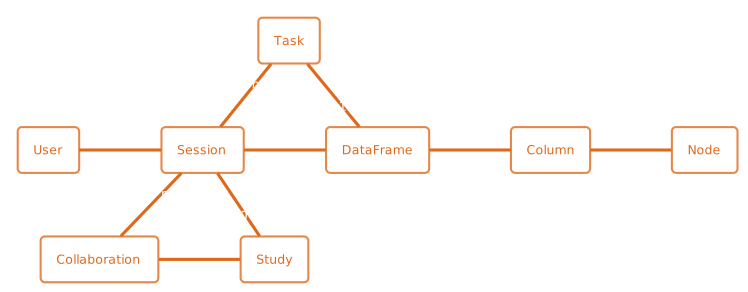
Dataframes are the representation of the data that will eventually be used in the most important tasks: computation tasks that produce the research results. Dataframes provide the following features:
The data is loaded in the dataframes once and can then be used multiple times. This saves the time of having to load the data from the source every time a new task is executed. This is especially useful when the database is large and retrieving the data is slow.
Dataframes can be modified using preprocessing tasks. These can, for example, add or remove columns, or filter rows. The latest version of the dataframe is used in the computation tasks. The dataframe keeps track of the last task that modified it.
Dataframes can have different permission scopes. You can create dataframes that are for your own use, but you can also share them with other users in your organization or with the entire collaboration. Users with the permission to share sessions with the organization or collaboration may also be able see, modify and delete your own dataframes. In other words, scoping a dataframe to yourself is not a way to keep the dataframe private, but it is only shared with users with higher permissions. Dataframes with an organization or collaboration scope are shared with all users in the organization or collaboration.
Dataframes provide a standardized way to store data. This makes it easier to write algorithms that can be used across different collaborations.
Data extraction, preprocessing and computation on the data are separated processes. This makes it easier to share algorithms with other projects. It even allows for the different steps to be written in different programming languages. Finally, it is also more secure, as the compute tasks no longer have access to the source data.
Dataframes have standardized metadata that they can share. This allows the infrastructure to provide the researchers with information about the data, such as which columns are available, and what the data types of those columns are.
Algorithm Step Types
Every algorithm function that is being executed in a vantage6 network is one of the following actions:
data-extraction: function to retrieve the data from the source, and store it in a dataframe.preprocessing: function to modify the dataframe.compute: function to use the dataframe to answer a research question. This can be a machine learning model, a statistical analysis, or any other type of computation.
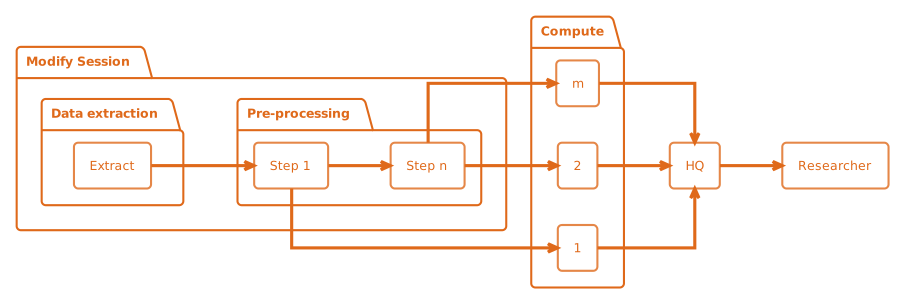
Fig. 6.1 An illustration of how the actions are related to each other. In this
example, there are n preprocessing steps and m compute steps. First,
the data is extracted. Then, the data is pre-processed. Finally, the data is
used to compute the research results. Note that in this schema, the first
compute task is done after the first preprocessing step - not after n
steps. At any point in the preprocessing steps, it is possible to send a task
to the current dataframe. It is thus also possible to execute a compute task
directly after data extraction. Finally, the results of each compute task are
sent to vantage6 HQ, where the researcher can access them.
These actions are managed by the infrastructure. For example, the infrastructure ensures that data extraction functions are the only functions that are allowed to access the source data.
Note
The user interface does not require you to know how these actions are triggered, but
the API endpoints used are as follows: compute tasks can be triggered using the /task
endpoint, and data extraction and preprocessing actions are triggered with the
/session endpoints. In the Python client, the three actions are represented by
client.task.create(), client.dataframe.create() and
client.dataframe.preprocess(), respectively.
Dependent tasks
As described above, there are tasks that modify the dataframe (data extraction and
preprocessing) and tasks that compute on the dataframe (compute). In order to
ensure that the dataframe is not modified while another task is using it to compute
analysis results, the infrastructure ensures that such tasks are executed in the
proper order. This is done by making the tasks dependent on each other.
There are three senarions:
A
data-extractiontask is not dependent on any other task.A
preprocessingtask is always dependent on the previouspreprocessingor, in case there is none, thedata-extractiontask. But it is also dependent on allcomputetasks that have been requested prior to the newpreprocessingtask.A
computetask is always dependent on the lastpreprocessingtask or, in case there is none, thedata-extractiontask.
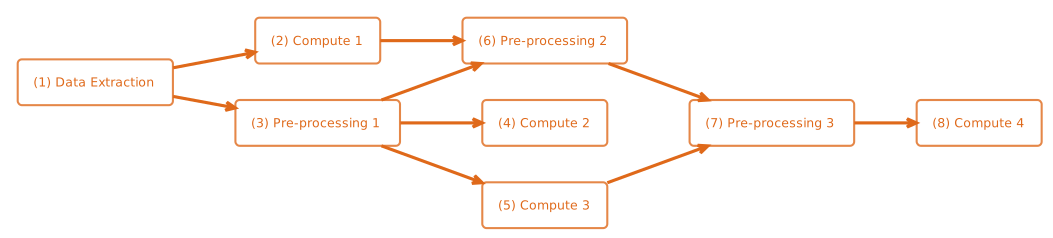
Fig. 6.2 Example dependency tasks tree in a single dataframe. Note that (7) is not dependent on (4) as in this case (7) was requested after (4) was completed.
Session storage
When a new session is created, each node creates a new session folder. In this folder,
the dataframes and session log are stored. This log keeps track on which action was
performed on the dataframe. You can inspect the log on the node by using the command
parquet-tools show state.parquet.
The session folder can also be used to share data between different tasks that are not
related to sessions, for example, when you need to store a secret key that is used in a
successor computation task. In the algorithms you can use the session folder with the
environment variable SESSION_FOLDER.